Billing & Settings
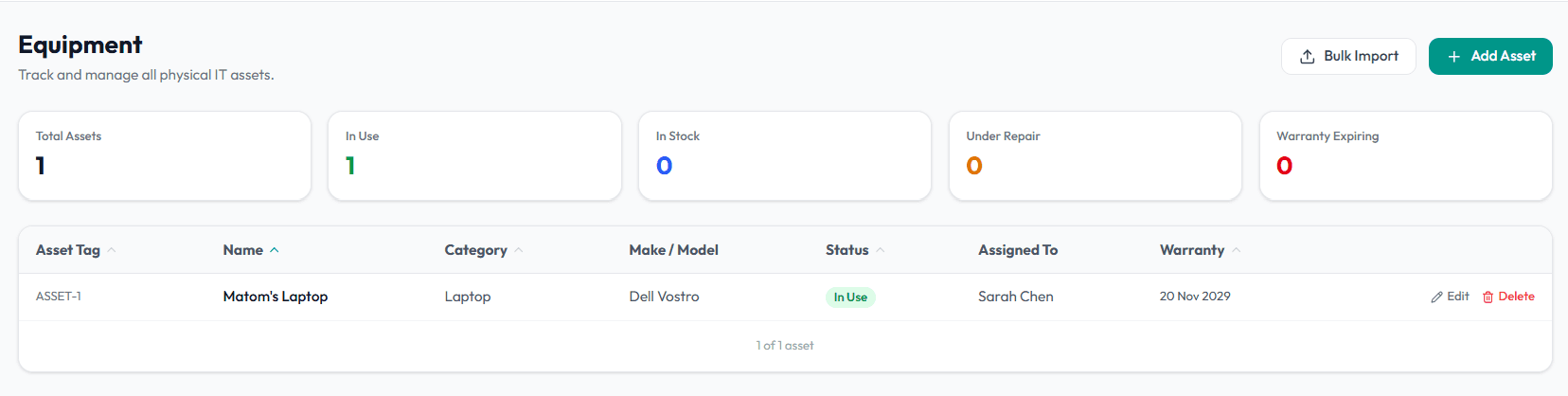
Track Equipment
Add equipment, assign assets to users, and maintain lifecycle status.
4 min readUpdated 14 May 2026
Overview
Use this guide to add equipment, assign it to users, and maintain lifecycle status.
Goal
Maintain an equipment register that shows ownership, condition, value, and lifecycle status.
Before You Begin
- Sign in to Liceo.
- Gather asset name, category, serial number, purchase date, value, condition, and user assignment.
Step 1 - Open Equipment
- 1Open Assets in the left sidebar.
- 2Select Equipment.
- 3Search for the asset before adding a new record.
Step 2 - Add equipment
- 1Select Add Equipment.
- 2Enter the asset name.
- 3Choose the category.
- 4Enter the serial number.
- 5Add purchase date and purchase value.
- 6Set current condition.
- 7Set lifecycle status.
- 8Save the asset.
Step 3 - Assign equipment to a user
- 1Open the equipment record.
- 2Select Assign.
- 3Choose the user.
- 4Confirm the assignment date.
- 5Add notes if needed.
- 6Save the assignment.
Step 4 - Update lifecycle status
- 1Open the equipment record.
- 2Select Edit.
- 3Change status to in stock, assigned, in repair, retired, or disposed.
- 4Add notes explaining the change.
- 5Save the record.
Step 5 - Prepare refresh planning
- 1Filter equipment by age, status, condition, or department.
- 2Review purchase value and purchase date.
- 3Identify assets due for refresh or disposal.
- 4Export or share the list for budget planning.
Troubleshooting
Equipment is assigned to the wrong user
Open the asset, update the assignment, and save.
Serial number is missing
Edit the asset record and add the serial number before audit review.
Retired equipment still appears active
Update lifecycle status to retired or disposed.
Was this article helpful? Send us feedback
← Back to Help Center